close
The ZIP is a commonly used file format to archive files with data compression. When you want to allow the user to download multiple folders and files at once from the server, you need to create a ZIP file on the fly. It helps to compress files and create an archive to download multiple files at once. The ZIP file can be created dynamically using PHP, and the archive file can be saved on the server from the PHP script easily.
Creating a ZIP archive from the directory can be easily implemented using PHP. The ZipArchive class in PHP provides an instant ability to compress files or folders into a ZIP file. You can archive the entire directory recursively to a ZIP file using PHP. In this tutorial, we will show you how to create ZIP file from a folder using PHP.
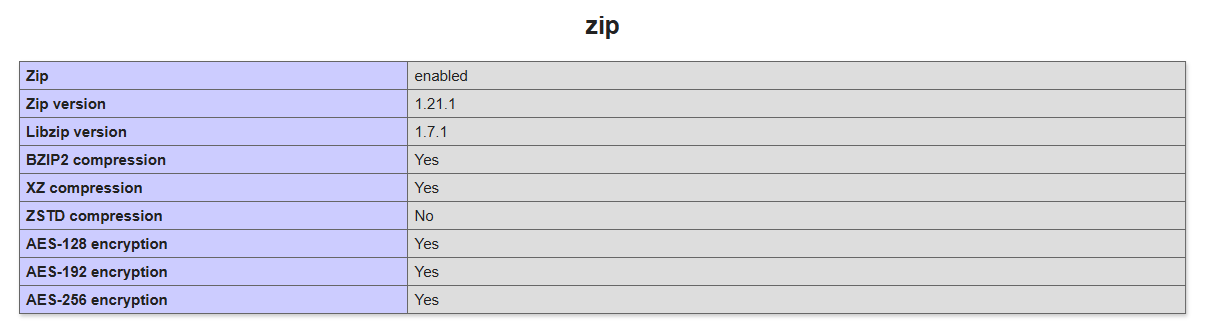
The zip extension must be installed and enabled on the server to make this script work. Check whether the following line is available in the php.ini configuration file. If already present in the php.ini, remove the semicolon to enable the ZIP extension.
extension=zip
You can also check the availability of the ZIP extension on your server by running the phpinfo() command on the browser.
The ZipArchiver is a custom PHP class that helps to create a ZIP file from folder (files and sub-directories) on the server using the ZIP extension.
$sourcePath – Relative path of the directory to be zipped.$outZipPath – Path to save the zip file.<?php
Class ZipArchiver {
/**
* Zip a folder (including itself).
*
* Usage:
* Folder path that should be zipped.
*
* @param $sourcePath string
* Relative path of directory to be zipped.
*
* @param $outZipPath string
* Path of output zip file.
*
*/
public static function zipDir($sourcePath, $outZipPath){
$pathInfo = pathinfo($sourcePath);
$parentPath = $pathInfo['dirname'];
$dirName = $pathInfo['basename'];
$z = new ZipArchive();
$z->open($outZipPath, ZipArchive::CREATE);
$z->addEmptyDir($dirName);
if($sourcePath == $dirName){
self::dirToZip($sourcePath, $z, 0);
}else{
self::dirToZip($sourcePath, $z, strlen("$parentPath/"));
}
$z->close();
return true;
}
/**
* Add files and sub-directories in a folder to zip file.
*
* @param $folder string
* Folder path that should be zipped.
*
* @param $zipFile ZipArchive
* Zip file where files end up.
*
* @param $exclusiveLength int
* Number of text to be excluded from the file path.
*
*/
private static function dirToZip($folder, &$zipFile, $exclusiveLength){
$handle = opendir($folder);
while(FALSE !== $f = readdir($handle)){
// Check for local/parent path or zipping file itself and skip
if($f != '.' && $f != '..' && $f != basename(__FILE__)){
$filePath = "$folder/$f";
// Remove prefix from file path before add to zip
$localPath = substr($filePath, $exclusiveLength);
if(is_file($filePath)){
$zipFile->addFile($filePath, $localPath);
}elseif(is_dir($filePath)){
// Add sub-directory
$zipFile->addEmptyDir($localPath);
self::dirToZip($filePath, $zipFile, $exclusiveLength);
}
}
}
closedir($handle);
}
}
Use ZipArchiver class to archive all files and sub-directories of the given folder and create ZIP file from the script in PHP.
zipDir() function of ZipArchiver class to create ZIP.// Include and initialize ZipArchive class
require_once 'ZipArchiver.class.php';
$zipper = new ZipArchiver;
// Path of the directory to be zipped
$dirPath = '/path/to/sourceDir';
// Path of output zip file
$zipPath = '/path/to/archive-'.time().'.zip';
// Create zip archive
$zip = $zipper->zipDir($dirPath, $zipPath);
if($zip){
echo 'ZIP archive created successfully.';
}else{
echo 'Failed to create ZIP.';
}
This ZIP file creation script is very useful to generate an archive dynamically on the server using PHP. The dynamic ZIP creation functionality can be used for many purposes, downloading multiple files and folders from the server, reducing the usage of the server space, taking a backup of files and directories, etc. You can easily enhance the functionality of this code as per your needs.
Looking for expert assistance to implement or extend this script’s functionality? Submit a Service Request
💰 Budget-friendly • 🌍 Global clients • 🚀 Production-ready solutions





In the case of selecting the files as it is done
example:
files / a.mp3
files / b.mp3
in the same zip